The Freedom Environment
(F.E. = effie)
Home Page
FE --- a *REALLY OPEN* Open Source system
(all executables are scripts --- for all to see)

The Freedom Environment
|
|
NEWS
OVERVIEW
DOWNLOADS
SCREENSHOTS
VIDEOS
CONTACT
LOGOS
On cell phones, to make the text larger,
try rotating phone to 'landscape' mode.
Or try double-tap on the document window.
|
FREEDOM-EYES --- that is, Freedom-ize!!!
SUBSYSTEM 1.
With this Freedom Environment subsystem installed, you will be able to 'drill-down' into your Linux/Unix (or Mac?) machine, with mouse clicks, to see what's there and what's happening (files, helps, executables, processes, etc.) --- to depths and breadths never-before-plumbed so easily. In addition, you can easily do many kinds of batch file conversions (media files and text files), many kinds of batch file renaming (general files, and special renaming of media files), many kinds of media file editing ... and creation ... and listening/viewing --- with a small set of mouse clicks ... ... where 'media' refers to
I'm talking about 'FE Nautilus Scripts'. 'FE Nautilus Scripts' is a cascade of menus of utility shell scripts (in categories such as IMAGEtools, AUDIOtools, VIDEOtools, FILESlists, FINDlists, SPACEtools, ...). The menus are provided by a file manager such as Gnome2-Nautilus or MATE-Caja. The cascading-menu structure is determined by the file structure of 'FE Nautilus Scripts' when its files are installed in a special scripts directory of the Gnome2 or MATE desktop system. The sub-directory filenames, like 'IMAGEtools', become the names of sub-menus. The script filenames in those sub-directories become the 'app-names' in the menus. The user can change the file structure and the filenames. And the user can edit the scripts to modify or enhance them. Further, the user can add scripts.
SUBSYSTEM 2.
Browse text files with the GUI text browser which has a unique 'Show-All-Match-Lines' capability that will blow you away with your search-efficiency gains --- especially on huge text files such as log files, large config files, large source code files, long lists, etc. etc. etc. ... even binary files. I'm talking about 'FE xpg'. The 'xpg' utility makes the 'feNautilusScripts' subsystem and the 'tkGooies' subsystem (see below) more powerful.
SUBSYSTEM 3.
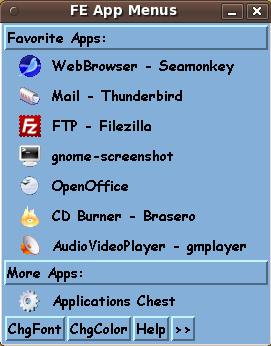
Arrange your applications into category menus of your own choosing and into menu sort orders or item groupings of your own choosing --- with complete and total access to the configuration files and scripts that are running the menu system. I'm talking about 'FE AppMenus'. 'FE AppMenus' is a system of 'pop-away' toolchests of applications (in categories such as IMAGEtools, AUDIOtools, VIDEOtools, and other categories of the user's choosing). The toolchests are defined by simple 'chest definition' files that can be edited by the user.
SUBSYSTEM 4.
This system is a multitude of Tcl-Tk GUI 'apps' in category menus using a menu ('toolchest') system like that used for 'feAppMenus'. I'm talking about 'FE tkGooies' --- a family of tkGUI's that augment the capabilities of 'feNautilusScripts'. 'FE tkGooies' is a system of 'pop-away' toolchests of Tcl-Tk GUI-generating scripts (in categories such as IMAGEtools, AUDIOtools, VIDEOtools, 3Dtools, PLOTtools, MAPtools, MATHtools, PHYSICStools, ...). The 'tkGooie' toolchests are defined by simple 'chest definition' files. Each toolchest has 'drawers'. A click on a toolchest drawer may pop up another toolchest --- or may pop up a 'tkGooie' GUI. The function of the drawers is determined by the 'chest definition' files --- which are editable by the user.
This may be of use to people not running Gnome/Nautilus or MATE/Caja :
If you mess up the configuration of any of these subsystems and can't figure out how to make it good again, these are relatively small, non-scattered systems. They are easy to delete and re-install --- quickly. No pain, no strain. To infinity and beyond.
Great for 'newbies' --- great for system-administrators Great for everyone in-between. It's FREEDOM E. --- that is, Freedom-y. Like Truth-y. We need both --- Freedomy-ness and Truthy-ness --- on our computers and in our world.
(Acknowledgments to Stephen Colbert or
|
|
You say you don't like this background image?
You say you would prefer a solid background color?
|
|
Neil knows. (audio snippet)
This is a link to a '.m3u' playlist file |
|
FE Logos I occasionally think about designing F.E. (effie) logos. Anyone want to design one and donate it? Why have one logo? There could be many. (There are thousands of Ubuntu logos --- or 'takes' on 'the' Ubuntu logo.) Consider 3D effects, color gradients, and animated GIFs. No Flash please. Let's keep it basic --- jpg's, png's and/or animated gif's. I have started collecting some candidates (of my own making or made by others) on an 'FE logos' web page. For Contact information, see the 'Contact' page. |
|
Site development info
This site was created on
Ubuntu 9.10 Gnome2-Gnu-Linux
I may update to a newer Debian-based Linux 'distro'
NOTE:
|
|
Page history:
Page was created 2008 Apr 11.
|